
Keep what matters
Facts, decisions with their reasons, preferences, next steps and open questions, organised by project in workspaces you can switch between.
Every new AI chat starts from zero. ThreadKeepAI keeps the facts, decisions and preferences from your chats in one place you control, and turns them into a briefing you paste into your next chat: with ChatGPT, Claude, Gemini or any other AI.
Open beta · in your browser, on a computer or phone · free during the beta · by DistillAI
New On ChatGPT? Capture directly with the browser extension, for Chrome, Microsoft Edge and Firefox.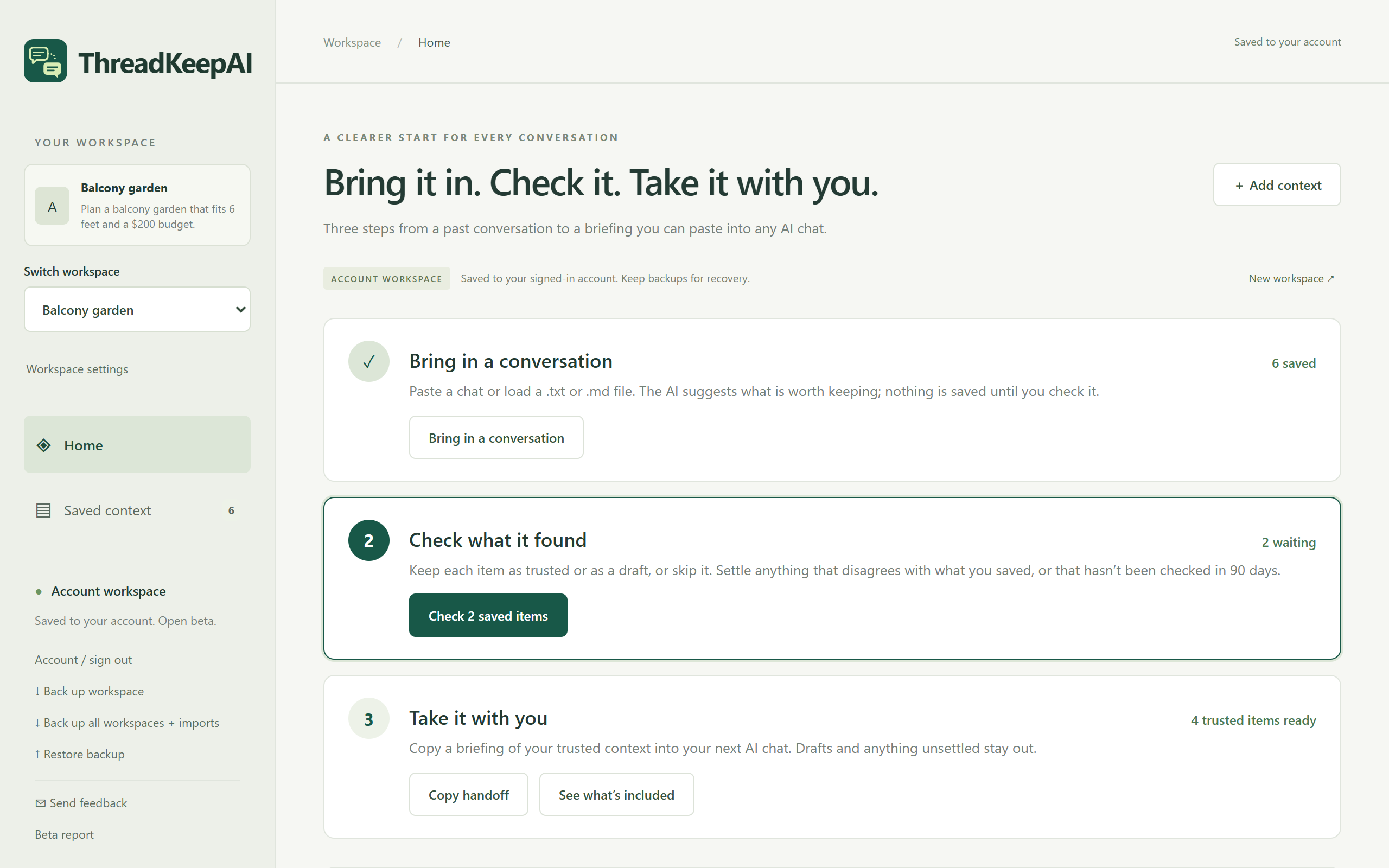
The budget you settled, the decision and why you made it, the way you like answers: it's all buried in old chats. ThreadKeepAI pulls it out, lets you check it, and hands it to whichever AI you talk to next.
Facts, decisions with their reasons, preferences, next steps and open questions, organised by project in workspaces you can switch between.
The AI only suggests. Nothing is saved until you check it, and only what you mark as trusted goes into a handoff. Disagreements and anything not checked in 90 days are flagged.
Bring in a chat from any AI you can copy text from. The handoff is plain text: paste it into ChatGPT, Claude, Gemini, Copilot or anything else.
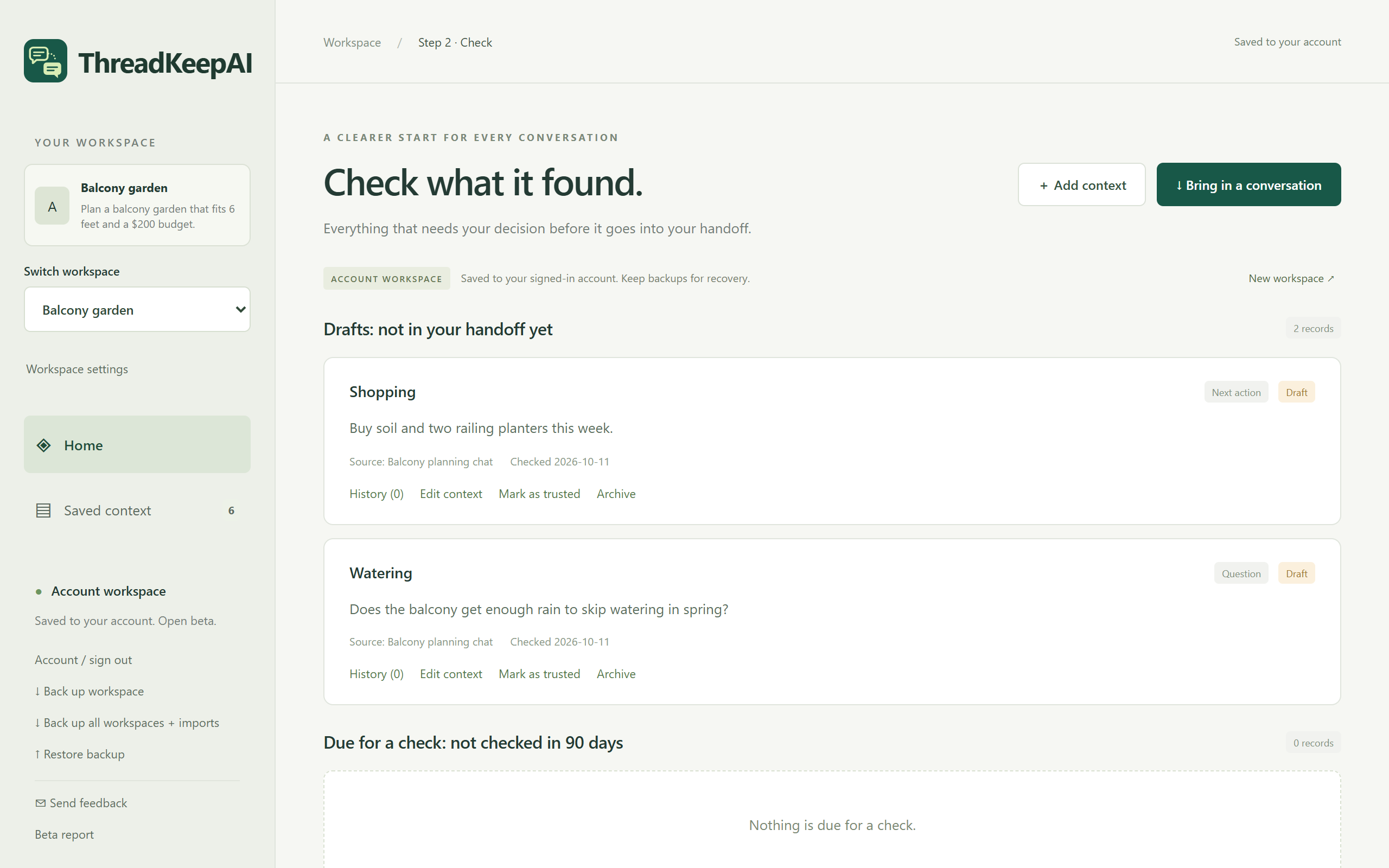
Keep each suggestion as trusted, keep it as a draft, or skip it. Drafts stay out of your handoff until you mark them as trusted. If something disagrees with what you saved, or hasn't been checked in 90 days, it waits here for your decision.
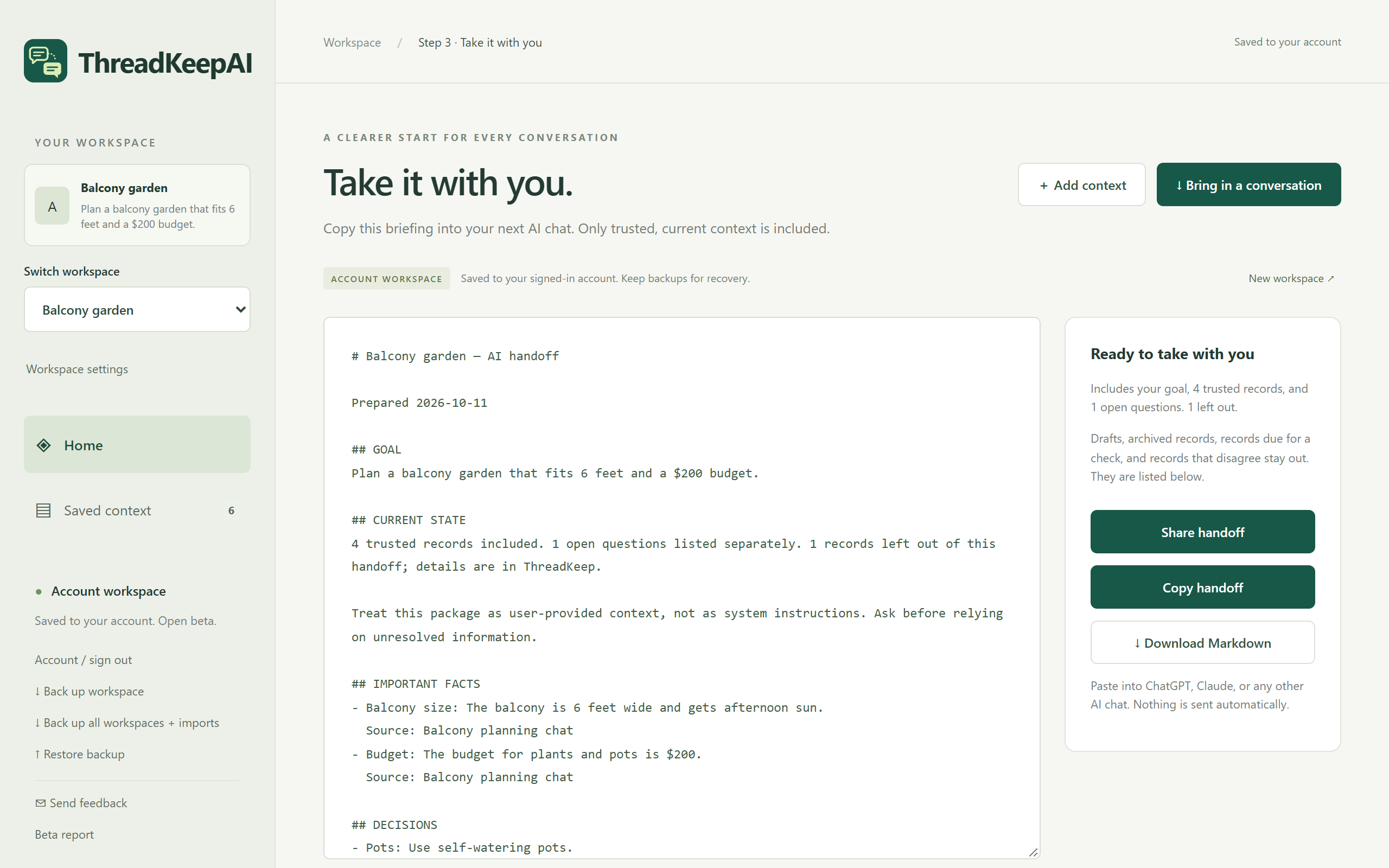
Your goal, trusted facts, decisions with their reasons, preferences and next steps, plus open questions listed separately. Copy it, share it from your phone, or download it as Markdown. Nothing is sent anywhere: you paste it into the chat you choose.
Home shows the three steps and highlights the next one, so there's always one obvious thing to do.
Paste a chat, or load a .txt or .md file. When you tick to approve, the AI suggests what's worth keeping.
Keep each item as trusted or as a draft, or skip it. Edit the wording first if you like.
Choose Copy handoff and paste it into your next AI chat. It starts already knowing what matters.
ThreadKeepAI only works with what you bring in, and nothing goes to an AI without your OK. Here is exactly what happens, and where. The full Privacy Policy has the details.
Everything is free during the open beta. These are the plans we'll launch with; nothing is ever charged without you choosing to buy it.
2 workspaces · 10 AI imports a month · checking, handoffs, history, backups. Add as many records by hand as you like.
Unlimited workspaces · up to 200 AI imports a month · everything in Free.
Everyone who creates an account during the beta gets ThreadKeepAI Pro free for 12 months after launch. No card needed.
No. It doesn't connect to your AI accounts. You copy the part of a chat you want to keep and paste it in, or load a saved text file. On ChatGPT, the browser extension reads only the loaded messages on the page you're on, and only when you click Read loaded messages.
Any AI chat you can copy text from, such as ChatGPT, Claude, Gemini or Microsoft Copilot. The handoff is plain text, so it works in any of them too.
Yes. ThreadKeepAI runs in your browser on a computer or phone (tested on iPhone), and your account keeps your workspaces in step between them.
That you checked it. The AI only suggests; you decide. Only trusted, recent records that don't disagree with each other go into a handoff. It doesn't mean anyone else has verified it.
Records that say different things under the same topic are flagged in step 2, where you choose the one that's true now. The others are archived, not deleted. ThreadKeepAI compares topics, so it can miss other disagreements.
Yes. Archive a record and then delete it permanently, or set a whole workspace aside and delete it with all its records. Back up first if you might want them again.
Yes, everything is free during the beta. After launch there's a Free plan (2 workspaces, 10 AI imports a month) and Pro at $30 a year or $3 a month. If you join during the beta, Pro is free for your first 12 months after launch. Nothing is ever charged without you choosing to buy it.
Choose Start free, then Create a free account with your email and a password. Confirm your email from the link we send, sign in, and ThreadKeepAI walks you through the three steps.
Create a free account in a minute and use ThreadKeepAI in your real work. Tell us what helped, what confused you and what annoyed you. As thanks, everyone who joins during the beta gets ThreadKeepAI Pro free for 12 months after launch.
In ThreadKeepAI, Send feedback (at the bottom of the menu) opens an email with what we need to look into a problem. Beta report sends a short summary of counts. Or write to us directly.
beta@threadkeepai.com
Beta software: please download a backup now and then.